
Conversational Attributes are live in the UK - and most retailers have done nothing
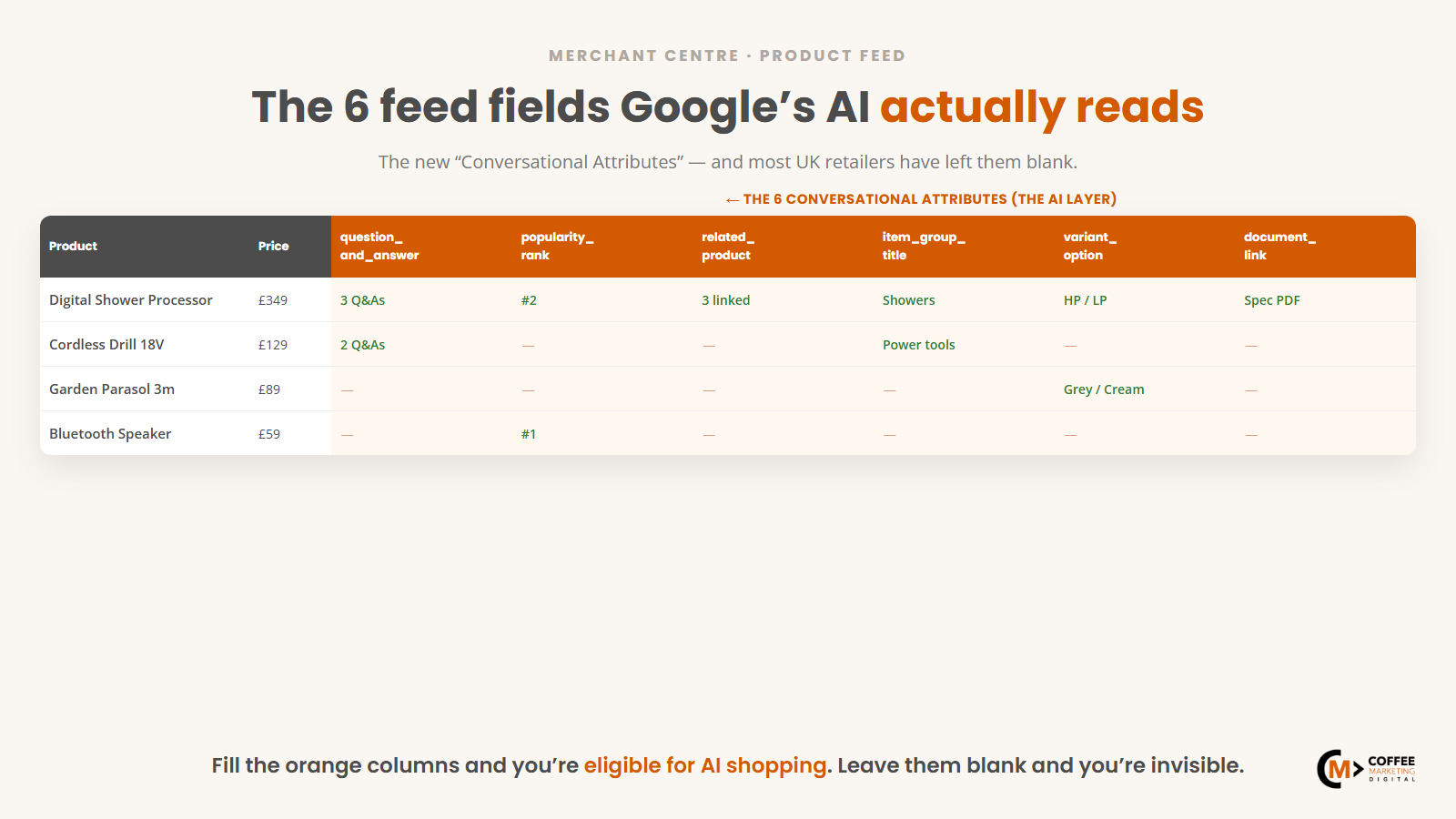
Google's Conversational Attributes are live in UK Merchant Centre. They've been generally available since Google Marketing Live 2026, and the window to be early is already closing - most UK retailers, including some on paid Merchant Centre support, haven't touched them.
This isn't a roadmap item for "someday". These six feed fields are in Merchant Centre right now, they're the fields AI Mode was built to read, and the retailers who fill them first get a structural head start in AI-driven product discovery that compounds over time.
What Conversational Attributes actually are
Merchant Centre has always had feed fields - title, description, GTIN, price, availability - the structured data that powers Shopping ads. Conversational Attributes are different. They're the first set of fields Google built specifically for AI-driven discovery, where a shopper asks a question in plain language and the AI assembles an answer from your feed rather than sending them to a results page.
There are six.
Question & Answer (question_and_answer)
Q&A pairs at product level. The AI uses these to answer conversational queries directly - "does this fit a 110mm waste outlet?", "is it safe for under-2s?", "what's the kerb weight when folded?". If you sell prams, a good Q&A field covers car-seat compatibility, fold dimensions, age range and weight limits. If you sell plumbing supplies, it covers fitting compatibility, pipe diameter and installation requirements. Most retailers already have this buried in product FAQs - populating Q&A is largely a data-migration job, not a writing one.
Popularity Rank (popularity_rank)
A rank position within a category. This lets you signal which products are your flagship sellers, independently of whatever bestseller list Google might infer from external signals. If your number-one trade pliers aren't surfacing for "best pliers for electricians", Popularity Rank is where you correct that.
Related Products (related_product)
Explicit links to companion or alternative SKUs - replacement parts, upgrade paths, accessories that ship together. The AI uses these to assemble bundle answers and suggest add-ons when a query implies more than a single purchase. If you already have "people also bought" data in your CMS or ERP, this is a direct mapping job.
Variant Option (variant_option)
This goes beyond colour and size - it captures the granular variants that matter in trade, home improvement and photography: voltage, finish, material grade, fitting type. If you sell electrical fittings in three voltage configurations, or tile adhesive in three bag sizes and two setting speeds, those need to be explicit fields in the feed, not buried in a product-title suffix the AI has to guess at.
Document Link (document_link)
A URL pointing to the spec sheet, installation manual or safety data sheet for a product. The AI pulls from linked documents when answering technical questions. For plumbing, electrical, tools and photography, this is often the field that separates a useful AI answer from a generic one. If your product page already links to a PDF spec sheet, this takes minutes per SKU.
Item Group Title (item_group_title)
A clean name for a product family that spans multiple GTINs - for example "DeWalt DCD796 Combi Drill" covering all its variants. Worth being precise: this is the new Conversational Attribute, distinct from the long-standing item_group_id that actually groups the variants together. Item Group Title gives that family a name the AI can use when it assembles a family-level answer, instead of treating each GTIN as unrelated.
Why this matters now
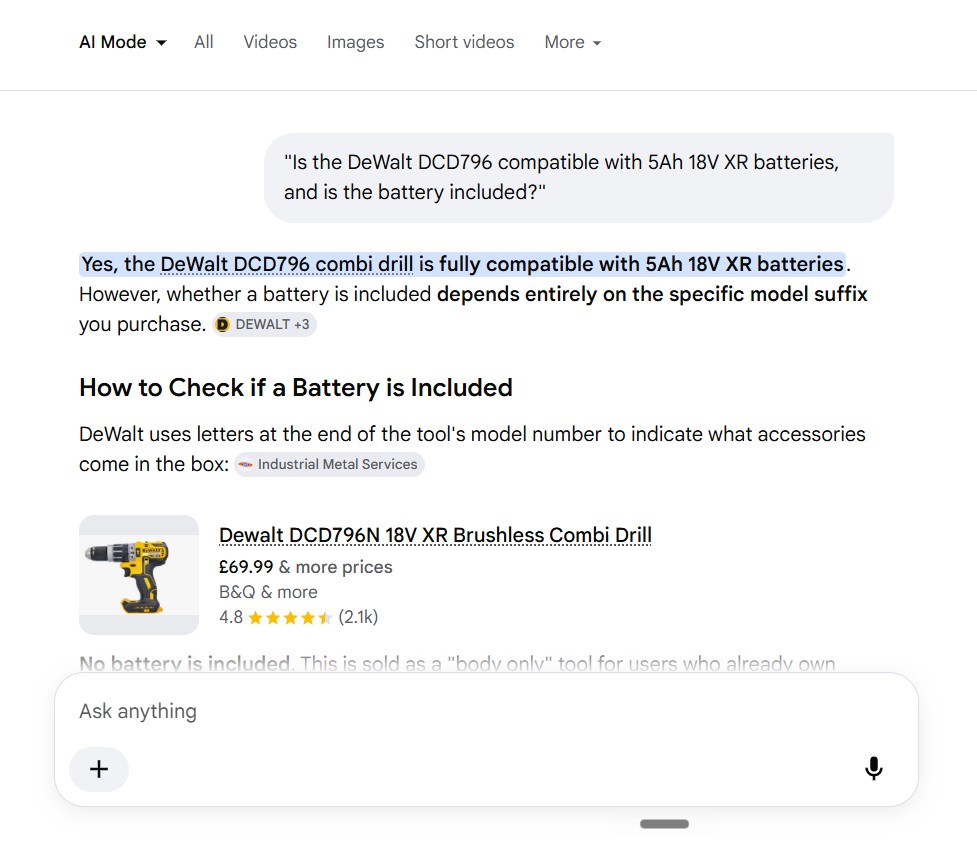
AI Mode pulls heavily from Merchant Centre feeds to populate its product answers. That's not a working assumption - we saw it first-hand in a live AI Mode test on one of our clients (a UK retailer we've worked with for years). When we asked the AI why a strong product wasn't surfacing, what it told us was blunt: if your feed isn't optimised for the way the AI reads it, you can simply become invisible. An AI describing its own behaviour isn't gospel - but it lines up with what we're measuring across accounts, and we've kept the screenshots. It's all part of the wider Google AI search shift.
The other Merchant Centre fields still matter - title quality, GTIN accuracy, product type. None of that becomes irrelevant. But Conversational Attributes are the only fields built specifically for AI Mode discovery. Retailers who haven't populated them aren't just missing an optimisation - they're operating without the data layer the AI is actively looking for.
The early-mover argument is simple: coverage across UK retail is still low, so the window to differentiate on feed quality is open now. Once enough catalogues fill these fields, the retailers who haven't will be ranked against the ones who have - with less signal, and a rising cost to catch up.
The audit by catalogue size
Here's what to actually do, matched to your catalogue size.
Under 500 SKUs
- Populate all six Conversational Attributes manually for your top 50 products by revenue this month.
- Start with Q&A - pull from your existing product FAQ or support inbox. Most of the content already exists.
- Add Document Link for any product that ships with a spec sheet or installation guide.
- Backfill the rest over the following weeks. Roughly 2-3 days of structured-data work at this scale.
500-10,000 SKUs
- Prioritise by revenue first - identify your top 200 products across all categories.
- Fill Q&A and Document Link for those 200 within the first 30 days.
- Build category-level Q&A templates for the rest - most products in a category share 70-80% of the same questions.
- Automate Related Products by mapping from your existing "people also bought" data.
- Use a supplemental feed to add the attributes without touching your primary feed source if your platform doesn't support them natively.
Over 10,000 SKUs
- Build a supplemental feed that maps from your CMS, ERP or PIM into the Conversational Attributes schema.
- Target 100% coverage of top-tier SKUs within 30 days of build completion.
- Use category templates for the long tail - you can't hand-write 10,000+ Q&A fields, but you can automate consistent answers by category.
- Treat Item Group Title as the first field to complete - lowest effort, highest impact for catalogues with complex variants.
Where most retailers go wrong
- Q&A written as marketing copy. "Our pram is designed for active families" isn't an answer. Q&A needs factual, question-specific responses: "Does it fit a Volvo XC60 boot? Yes - folded dimensions are 90 x 55 x 30cm."
- Document Link left blank. If a product has a spec sheet, manual or safety data sheet and you haven't linked it, you've left the most technically credible signal empty.
- Item Group Title misused. It's for naming a product family across GTINs, not repeating the individual product ID. Misuse stops the AI assembling coherent family-level answers.
- Popularity Rank set once and forgotten. If your bestsellers shift each quarter, your Popularity Rank needs to shift with them.
- Related Products pointing at out-of-stock SKUs. The AI will surface those suggestions - and a dead-end breaks the experience.
- Variant Option too generic. "Multiple sizes" defeats the point. The field needs the actual values so a technical question can be answered from it.
Where this sits in the bigger picture
This work isn't tied to one stage of growth. As Alistair put it recently: "You can audit at any stage of the maturity model, but the checklist varies - Stage 1 is basic llms.txt, Stage 3 is FAQs on product pages. The six Conversational Attributes sit across all of them." (More on the maturity model here.) There's no catalogue too small and no stage too early to start - the effort scales with your catalogue; the cost of not starting scales with how long you wait.
From the team
"Winning paid and winning organic used to be enough to get surfaced. It isn't any more. The work has moved to the quality of your data - the feed, the attributes, the structure - and that's exactly where we're putting our clients' effort now."
— Alistair Williams, Coffee Marketing
Where to start
If you want to know where your feed stands - which Conversational Attributes are missing, and the order to fix them in - that's exactly what a feed audit covers. It's the cheapest way to materially change your AI visibility, and the gap between retailers who've done this and those who haven't is already measurable.